The Strategy Tester, 15s and 30s bars, Expiry Day and Futures Term panels, and each symbol's own tick
OpenScript strategies now backtest on the chart in a new Strategy Tester, with estimated Indian F&O charges and stops and targets that fill inside the bar. Charts gain 15-second and 30-second bars, two new panels follow expiry day and the futures roll, the Watchlist gains order-flow columns, indicator panes fit their data and keep their heights, and every chart now uses its own symbol's exchange tick instead of 0.05.
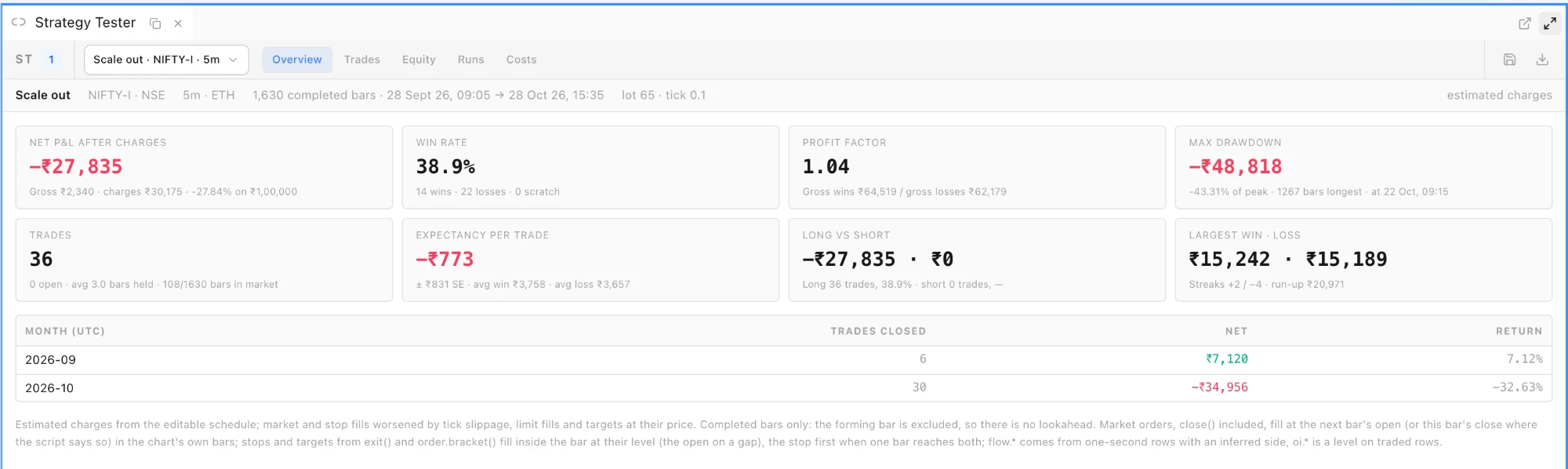
Strategy Tester, under Widgets ▸ Charting & Analysis, backtests any OpenScript script that declares strategy() once you apply it to a chart from Indicators ▸ My Scripts. It runs on completed bars only, so there is no lookahead, and re-runs by itself whenever the chart's bars change. Overview shows net P&L after charges, win rate, profit factor, max drawdown, expectancy, long versus short and a month-by-month table; Trades lists every round trip with its excursions, and a click scrolls the chart to the entry; Equity draws the equity curve and drawdown; Runs saves and exports run records; Costs holds an editable charge schedule per profile (NSE, BSE and MCX futures and options, and equity intraday) with brokerage, STT or CTT, exchange and SEBI charges, stamp duty, GST and slippage in ticks. Entries and exits are marked on the chart. Stops and targets from exit() and order.bracket() fill inside the bar at their level (at the open on a gap), and when one bar reaches both, the stop is taken. Pro and Max. Strategy Tester guide.
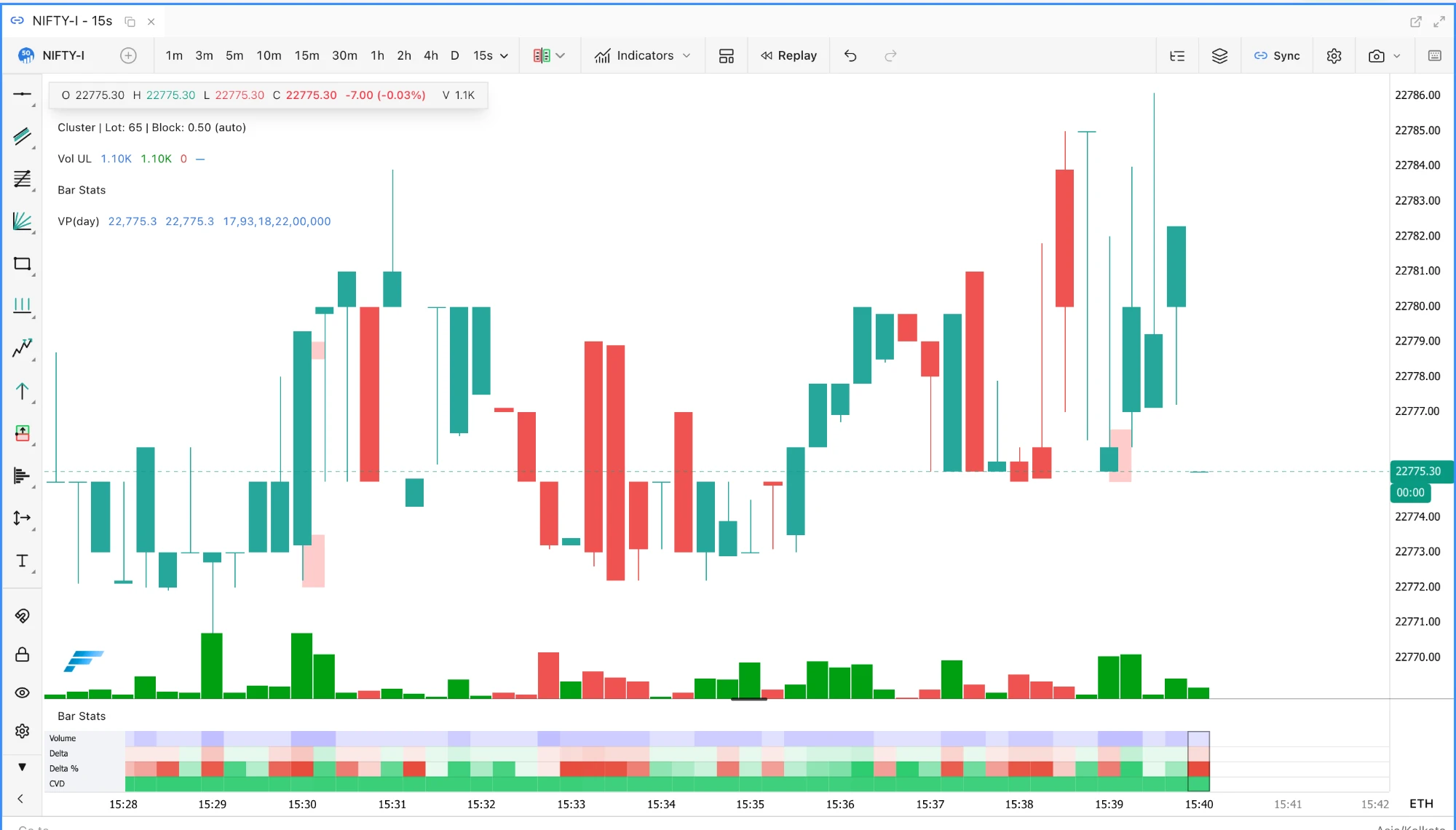
15s and 30s bars. The interval menu has a new Seconds · one-second rows group with 15s and 30s. These bars are built in the browser from the feed's one-second rows, with volume, inferred delta, CVD and open interest on every bar, and they work with Renko, P&F and Kagi. An alert created from a seconds chart is evaluated on 5m bars on the server, and the alert dialog says so. Pro and Max.
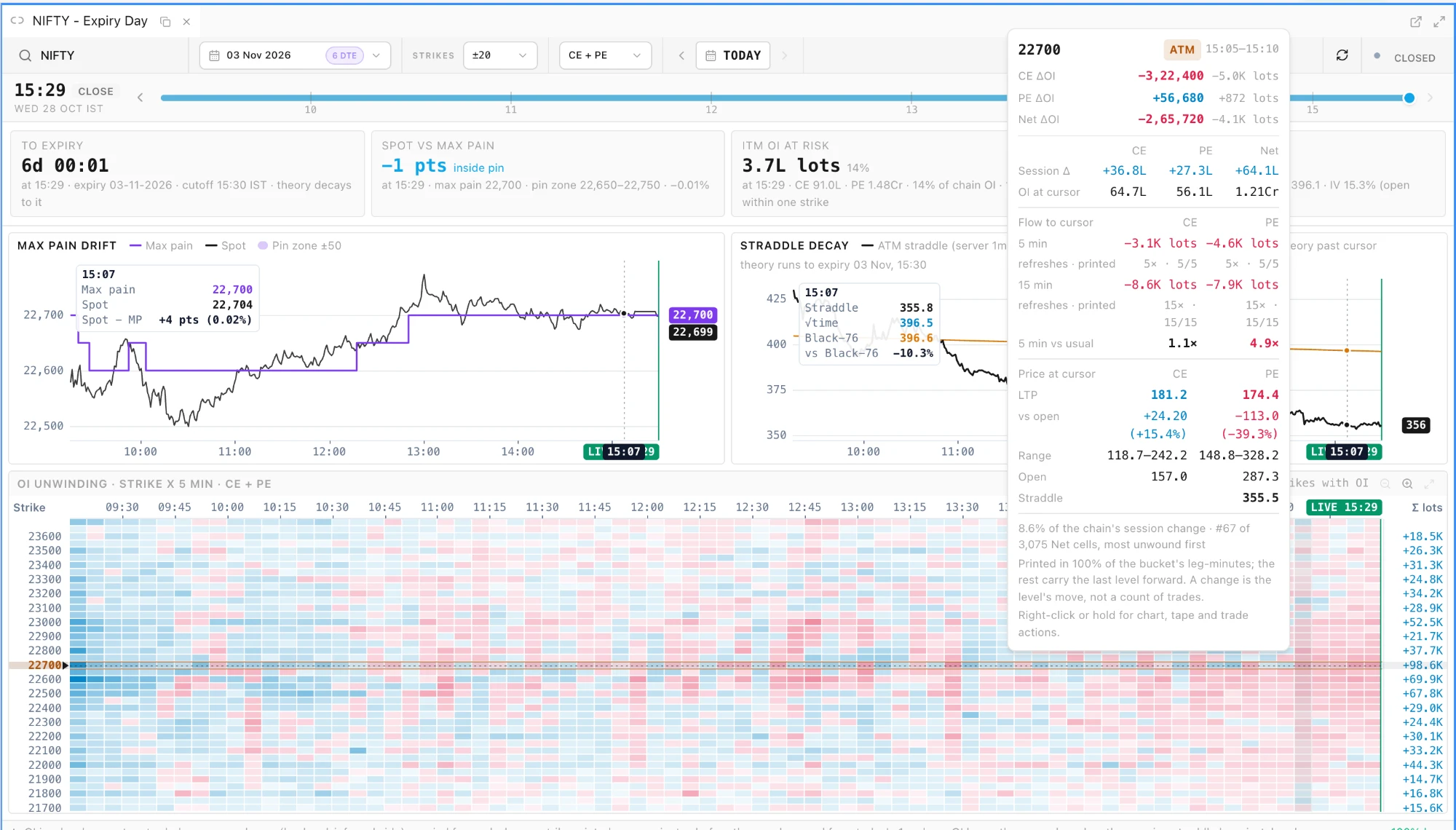
Expiry Day panel, under Widgets ▸ Options Trading, follows an expiring index through the session, live or replayed on a past trading day. Its cards show the time to the cutoff, spot against max pain, ITM open interest at risk and straddle decay. Two charts track max pain drift against spot and the ATM straddle against √time and Black-76 decay, and a strike-by-five-minute heatmap shows where open interest is unwinding. Hover a cell for a Flow to cursor readout per leg: the 5-minute and 15-minute OI change in lots, how often the level actually changed, and the 5-minute change against the strike's own usual. Cells whose change is at least twice their strike's usual are outlined, at most five at a time, and the outlines follow the CE + PE, Calls and Puts switch. Pro and Max. Expiry Day guide.
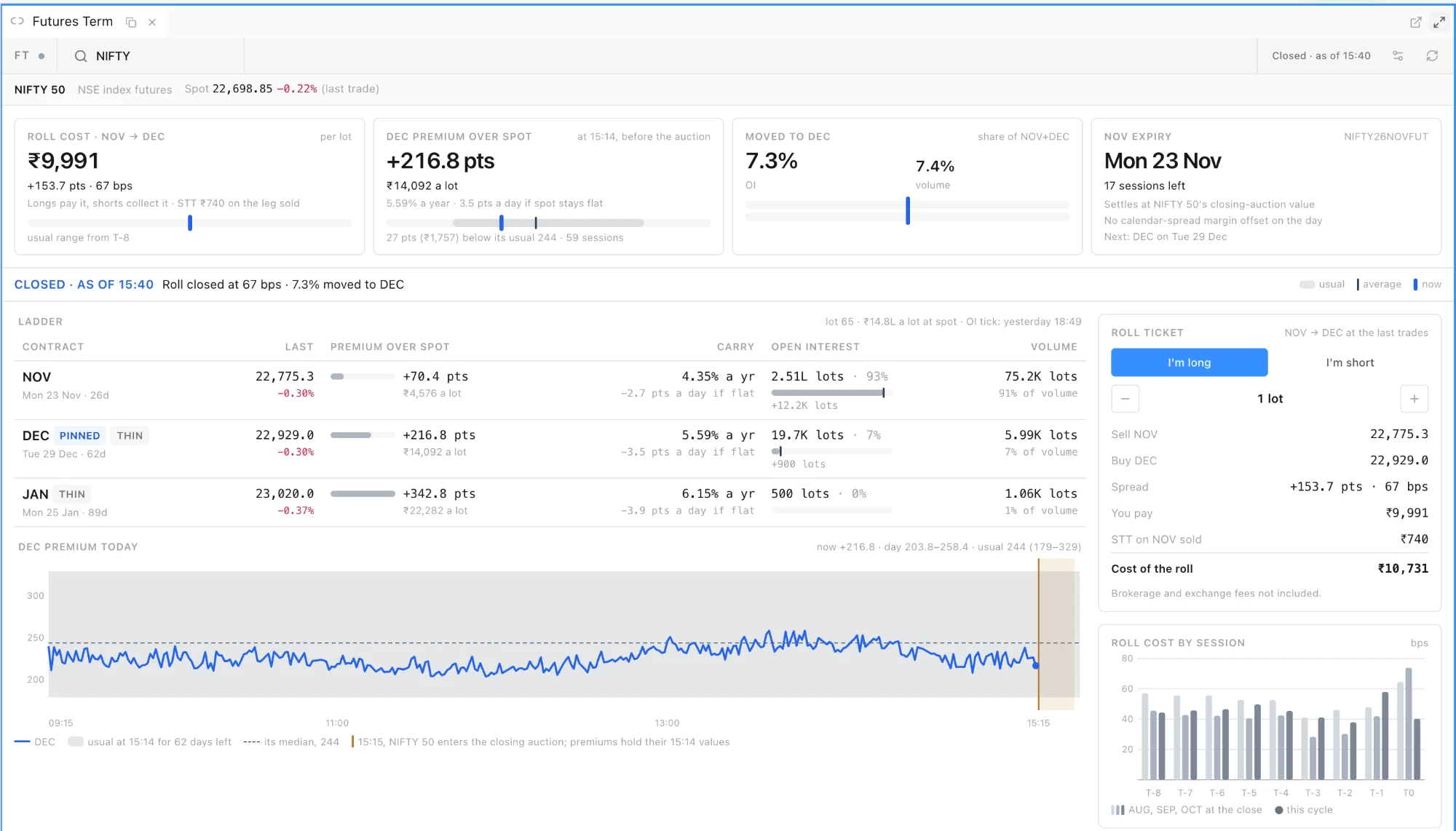
Futures Term panel, under Widgets ▸ Options Trading, reads an underlying's futures for the roll. Four cards show the Roll cost (₹ a lot, points, bps and STT on the leg sold), the premium over spot, the share of open interest and volume Moved to next month, and the near expiry, each on a meter with its usual range, average and current value. The roll cost and moved share are compared with the same session in the last three expiries, and the premium with the usual carry of contracts with about a month left. Below them are the expiry ladder (premium, carry, OI share and volume share, with Pinned, Settles today, Settled and Thin chips), a Roll ticket for a long or short roll, roll cost by session from T-8 to expiry and the premium through the day. From 15:15, while NSE spot is in its closing auction, premiums and carry hold their 15:14 values. On a phone, the panel switches to Ladder, Roll and Today tabs. Futures stream live on Pro and Max (MCX on Max); other plans see the last close. Futures Term guide.
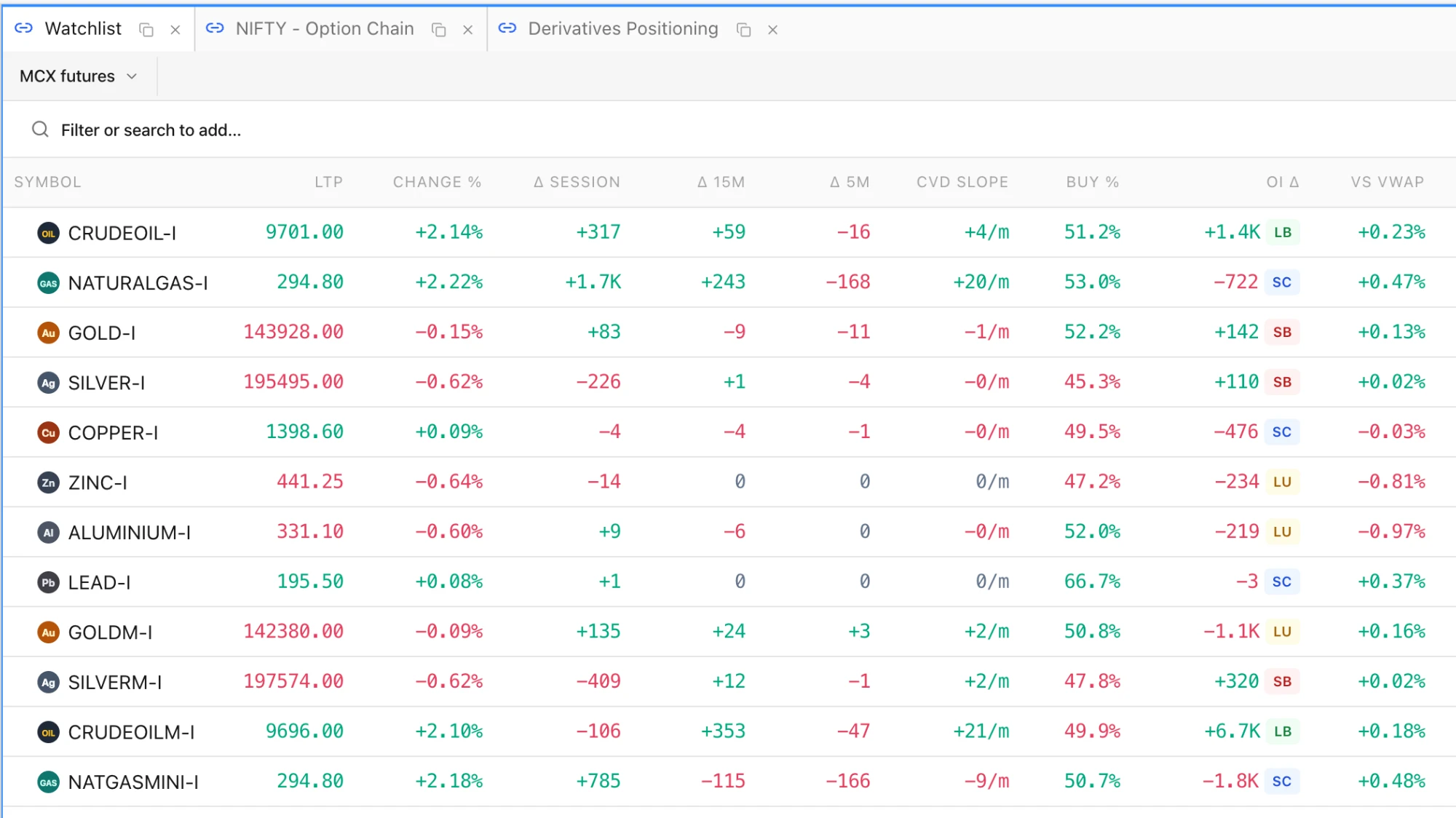
Flow columns in the Watchlist. Choose the Flow preset in Customize view (the column button in the Watchlist toolbar) for Δ Session, Δ 15m, Δ 5m, CVD Slope, Buy %, OI Δ with a long build-up, short build-up, short covering or long unwinding badge, and vs VWAP. The session columns are seeded from today's 1m footprint, and the side of each second is inferred from the one-second feed rows. Index symbols show n/a, since they carry no volume or open interest. Pro and Max. Watchlist guide.
The Strategy Tester's Overview for a strategy on NIFTY futures, with charges estimated from the Costs tab.NIFTY futures on 15-second bars, built from the feed's one-second rows.Expiry Day on NIFTY with the hover card on the ATM strike: the Flow to cursor block shows the 5 and 15 minute OI change per leg against its usual.Futures Term on NIFTY: roll cost, premium and moved share against their usual ranges, the ladder, the roll ticket and roll cost by session.The Flow preset on a Watchlist of MCX futures: delta over three windows, CVD slope, buy share, OI change with its build-up and the distance from VWAP.
Improved
Every chart uses its symbol's own tick. Charts assumed a 0.05 tick for every symbol; they now take each symbol's exchange tick from the symbol master (0.1 on NIFTY futures, 0.2 on BANKNIFTY futures, 1 on CRUDEOIL), and footprint rows, profiles, TPO, Tick Range, Renko, P&F, Kagi, Big Trades, the scanner, the Depth of Market ladder and the Tick Analyser all count in it. The price axis shows as many decimals as the tick, one on NIFTY futures. Settings that already counted ticks now count real ticks, so on NIFTY futures the footprint's Manual Bin Size (ticks), the TPO chart's Bin Size (ticks), and the Tick Range, Renko, P&F, Kagi and Fixed Range Volume Profile settings draw rows twice as tall as before; halve the number to keep the old size. Automatic and LTP-based footprint rows keep their size, rounded to whole ticks.
Profile bin sizes are set in ticks. The bin size override on Volume Profile, Stepped Volume Profile, Market Profile and FP Summary, and the TPO chart's volume profile, is now Bin Size (ticks). A size saved as a price converts once to the nearest whole number of ticks when the symbol's tick is known, so a profile keeps its rows: 4 points on NIFTY futures becomes 40 ticks. The DOM step and the Tick Analyser row size are numbers of ticks too, and the DOM shows a row for every tick by default. Volume Profile guide.
Value area from the bigger neighbour. Volume Profile (session, developing and composite) and Market Profile build the value area from the POC by adding whichever neighbouring row holds more volume, instead of adding a row above and a row below in turn. This matches the scanner and Footprint Summary, and moves VAH and VAL on many days.
Indicator panes fit their data. Each pane fits the bars on screen as you scroll; dragging, wheeling or pinching its axis fixes the range, and double-click, Reset scale, the 0 key or Auto-fit in the axis menu switch it back. RSI, Stochastic, MFI and ADX stay within 0 to 100, volume and histograms stand on zero, and standard levels are drawn (Stochastic 80/20, CCI ±100, zero lines on AO, ROC, TRIX, KST and Force Index). The price chart keeps at least 100 px; further panes fold behind a +N panes chip, and Hide All Panes in the chart menu hides them all. Pane heights are kept with the workspace.
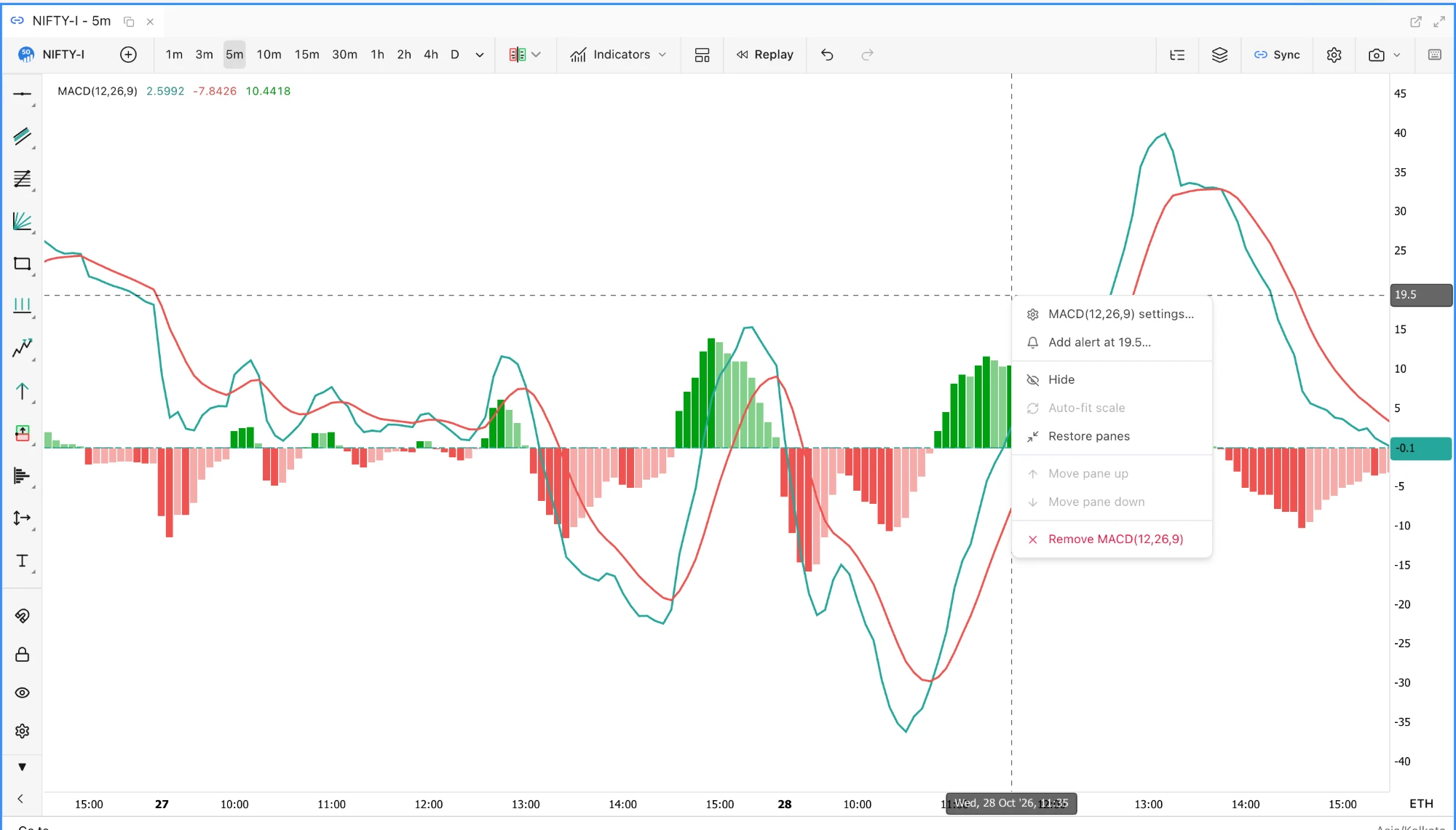
Pane headers and menu. Each pane's title row now looks and behaves like the price legend, with collapse, maximize and auto-fit buttons. Right-click a pane for its settings, an alert at the cursor level, hide, auto-fit, maximize, move up or down and remove; on touch screens a ⋯ button opens the same menu. Removing a pane shows an Undo button. A pane that cannot draw says why, for example "MACD needs 35 bars". CVD, OBV and IV can be drawn on the price chart's left axis.
Script data contract v2. Scripts can read open interest (oi.value, oi.change, oi.buildup and more), the bar's footprint (fp.poc, fp.vah, fp.val, imbalances and more) and flow.sessionCvd, from the same per-bar values as the Data Inspector and the CSV export. The Script Editor lists every field under Data reference (contract v2: flow, oi, fp). Script Editor guide.
Replay on phones. Tap a candle to start a replay there, or hold to aim first and tap Start here. The replay controls fit a phone screen in two rows, the timeline scrubs with a finger, and speed and step size use the same dropdowns as the rest of the terminal. Replay guide.
A maximised MACD pane with its right-click menu: settings, an alert at the cursor level, auto-fit, restore, move and remove.
Fixed
Indicator templates keep your chart. Loading an indicator template no longer replaces every drawing on every symbol, the chart settings, or the symbol and timeframe.
MACD and Volume periods. Periods typed in the add dialog for MACD and Volume are now applied; saved layouts with the old values still open.
Linked charts and panes. Hovering an indicator pane moves only the time on linked charts; it used to send the pane's value as a price. A study that fails while drawing no longer freezes the chart, IV and Greek panes leave gaps for missing data instead of drawing zeros, and idle charts no longer repaint every pane once a second.
Session End level lines. With Extend Until set to Session End, a profile's POC, value area, LVN and HVN lines ran through the whole next session whenever the profile closed with its session. They now stop at the close of the session the profile ends in.
Profiles synced from another chart. A Volume Profile or other study imported from a chart on a different symbol, through a workspace, a template or a linked chart, kept that chart's tick and bin size until the zoom or timeframe changed. It now takes the chart's own.
Cluster text keeps one size while zooming. Footprint cells could draw at two font sizes in the same candle and pass through fractional sizes while zooming; every row now shares one whole-pixel size.
Strategy `close(tag)` no longer closes another entry's units once its own entry has exited.

 by TrueData