
 by TrueData
A real Mac window
FutPrint has its own Dock icon and shows up in Command-Tab and Mission Control. Use full screen and Split View, or give it a desktop Space of its own for the trading day.
The FutPrint order-flow terminal as a native macOS app. Footprint charts, volume and market profile, option chains, scanners and replay for NSE, BSE and MCX, in its own window with its own Dock icon. One universal download runs on Apple silicon and Intel Macs.
Free to download. Sign in with your FutPrint account; data and tools follow your plan. Until then, the same terminal is open in your browser, and Windows is coming at the same time.
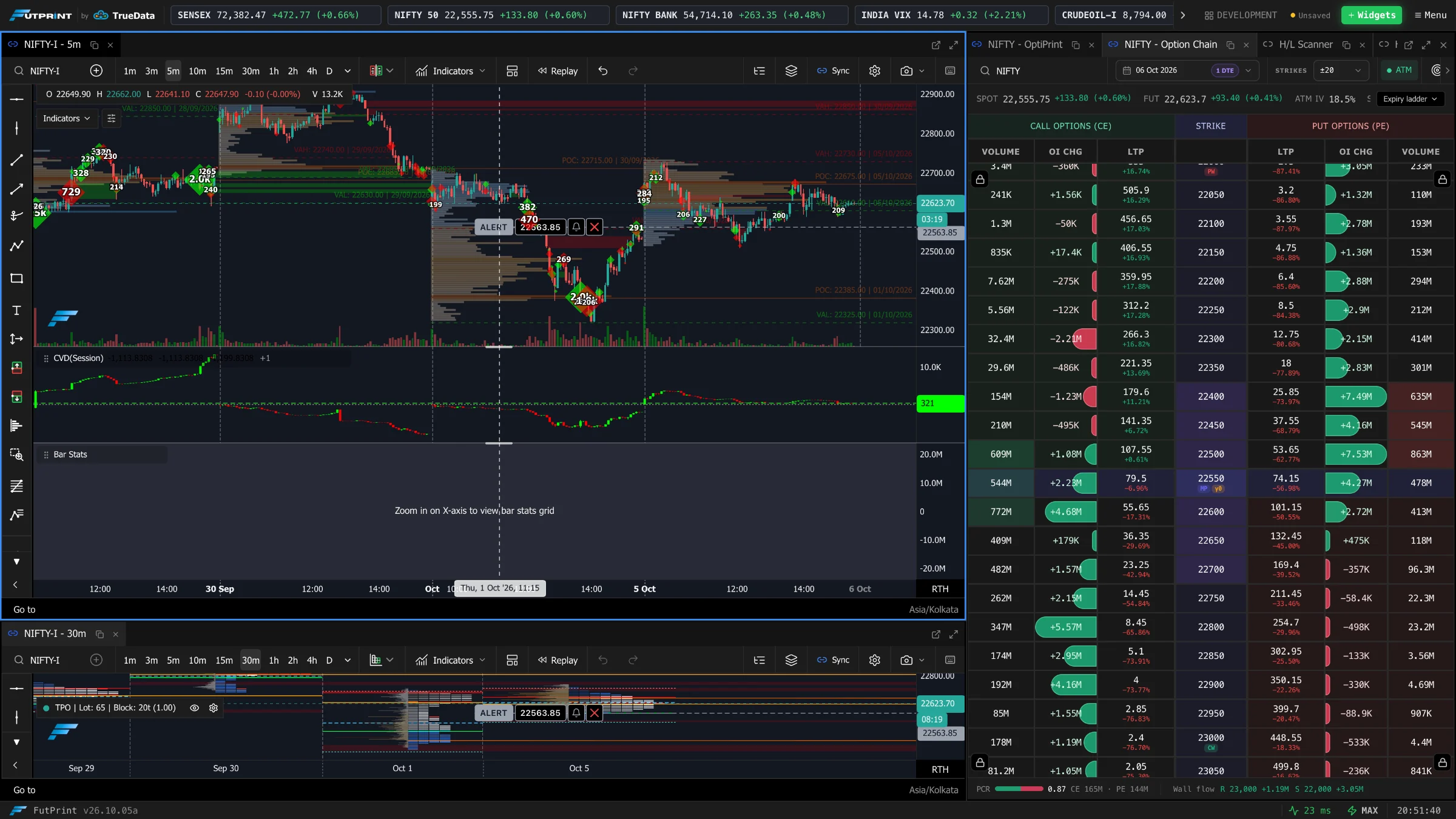
The desktop app is the FutPrint terminal itself, packaged for macOS. Every module, indicator and setting is identical, so what you learn in one works in the other.
A docked workspace with chart, footprint, option chain and watchlist · application capture
No accounts to link, no data feeds to configure and no settings to import. Install, sign in and your workspaces are waiting.
One universal .dmg covers every Mac. There is nothing to choose between Apple silicon and Intel.
Open the disk image and drag the FutPrint icon onto the Applications folder. That is the whole installation.
Launch FutPrint from Launchpad, Spotlight or the Applications folder, then sign in with email or with Google through your browser.
First launch only. The first time you open FutPrint, macOS may say it cannot verify the app. Open System Settings, go to Privacy & Security and click Open Anyway. macOS only asks once.
Step-by-step instructions, with what to do if something goes wrong, are in the installation guide
A dedicated app removes the small frictions of trading in a browser tab and uses the security and window management your computer already has.
FutPrint has its own Dock icon and shows up in Command-Tab and Mission Control. Use full screen and Split View, or give it a desktop Space of its own for the trading day.
No tabs, address bar or extensions. The whole window belongs to your panels, and browser shortcuts no longer compete with the terminal's own.
Your session is stored in the macOS Keychain, the same secure store Safari and Mail use, so FutPrint opens signed in without keeping secrets in plain files.
Choose Google and FutPrint opens your default browser, where you are probably already signed in. When you finish, the browser hands you straight back to the app.
FutPrint uses the WebKit engine built into macOS instead of shipping a browser inside the app. The download stays small and the app stays responsive beside your other tools.
Opening FutPrint again brings the running window forward instead of starting a second copy, so a session never splits in two by accident.
Installing a new release is the same drag you did the first time. Nothing is migrated, re-entered or rebuilt.
Download the latest disk image and drag FutPrint to Applications. Choose Replace and the new version takes the old one's place.
Your session lives in the macOS Keychain, outside the app, so the new release opens already signed in.
Saved workspaces, layouts and watchlists sync to your FutPrint account, so they appear the same in the browser and on every computer you sign in to.
Prices, open interest, scanners and analytics stream from TrueData's servers. They are up to date the moment the app opens, whatever release you have installed.
Use whichever suits the computer in front of you. Your account, plan and saved workspaces are the same in both.
| Compare | In the browser | FutPrint for Mac |
|---|---|---|
| Getting started | Open futprint.truedata.in and sign in | Install once, then open from the Dock, taskbar or Start menu |
| Window | A browser tab beside your other tabs | Its own window, icon and app switcher entry |
| Sign-in | Kept by your browser | Kept in the system keychain |
| Updates | Every change arrives on the next page load | Install a new release over the current one |
| Runs on | Any current browser, including Linux and Chromebooks | macOS (Apple silicon and Intel) and 64-bit Windows 10 and 11 |
| Modules, data and plan | Everything in your plan | Exactly the same |
FutPrint does the heavy lifting on TrueData's servers, so any recent Mac runs it comfortably.
| Mac | Any Mac with Apple silicon (M1 or later) or an Intel processor. One universal app covers both. |
|---|---|
| macOS | A supported, up-to-date version of macOS. FutPrint uses the system WebKit engine, so macOS updates keep it current. |
| Display | The window opens at 1440 × 900 and works down to 1024 × 640. Larger and external displays give dense workspaces more room. |
| Connection | An internet connection for sign-in and live market data. |
| Account | A FutPrint account on any plan, including Free. Data timing and tools follow the plan. |
| Installer | Universal disk image (.dmg). |
The app is free to download. It uses your FutPrint account, so the Free plan works with end-of-day data, and Lite, Pro and Max unlock their usual data and tools. There is no separate charge for the desktop app.
Yes. FutPrint for Mac is a universal app with native code for Apple silicon (M1 and later) and for Intel Macs. The same download works on both.
It is the same terminal. The desktop app packages the FutPrint web build in a native macOS window, so every module, setting and indicator matches the browser version, and the screenshots on this page are real captures.
Yes. Workspaces saved to your account appear in the Mac app as soon as you sign in, and changes you save on the Mac appear in the browser too.
Open System Settings, choose Privacy & Security, scroll to the Security section and click Open Anyway next to the FutPrint message, then confirm. macOS remembers the choice, so this happens only on first launch.
Download the latest disk image and drag FutPrint to Applications, choosing Replace. Your sign-in, workspaces and settings carry over.
Quit FutPrint and drag it from Applications to the Bin. To remove the saved sign-in as well, delete the in.futprint.desktop entries in Keychain Access.
Not yet. On Linux, a Chromebook or any other computer, open FutPrint in a current browser; it is the same terminal.
Data timing, coverage and tools vary by plan.