
 by TrueData
Ask FutPrint: help that answers from the guides
A help assistant in the terminal header answers how-do-I questions from the FutPrint guides, links the page each answer rests on, and says so when the guides do not cover something. Where it lives, what it refuses, what it stores, and how to ask well.
FutPrint by TrueData · Published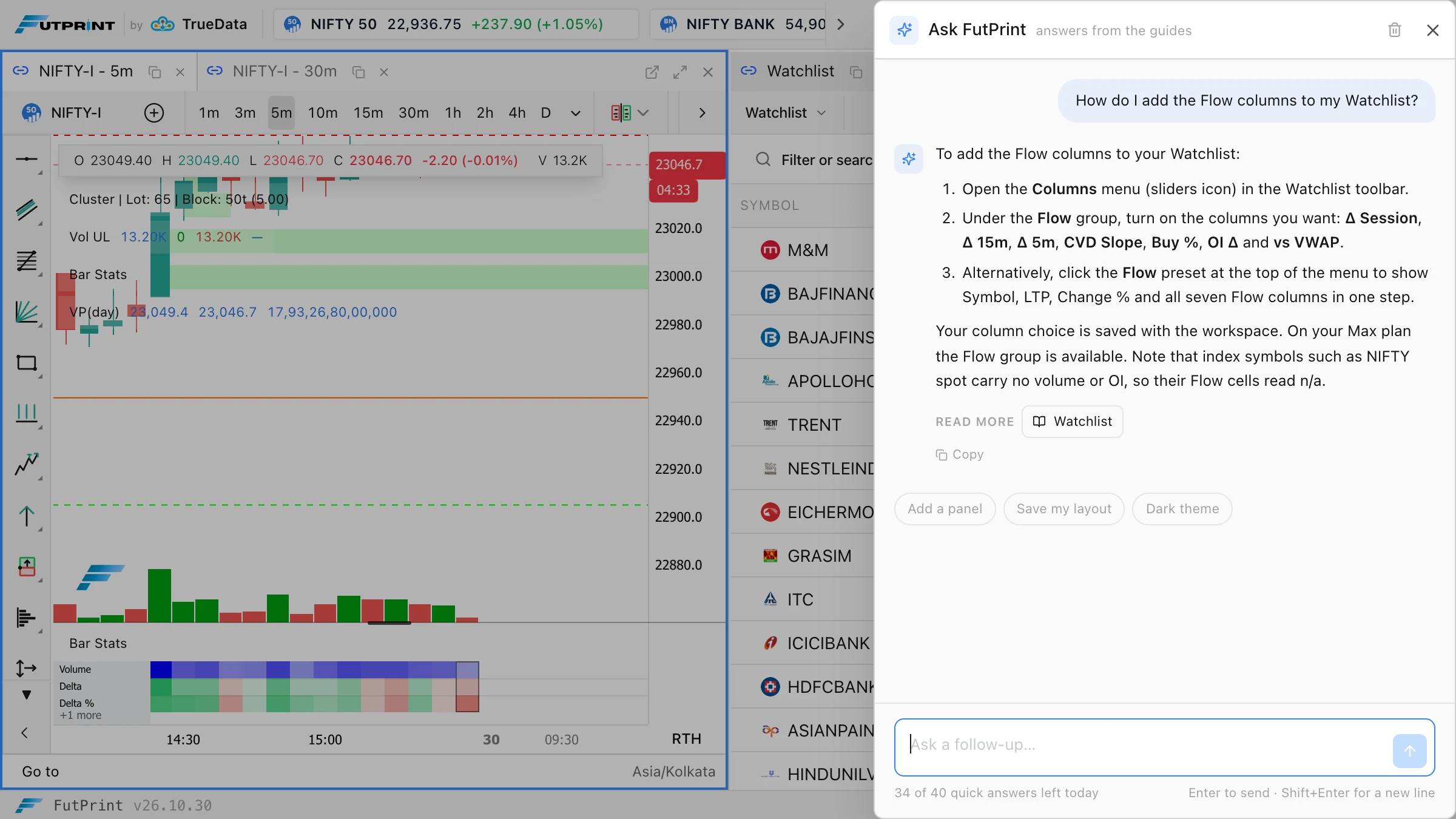
A question, answered from the guides
Every trading terminal has a moment where you know what you want to do and not where the control is. The imbalance threshold is somewhere in the footprint settings. The Watchlist has a Flow preset, but which button shows it. A strategy draws its plots but no trades, and the reason is in a guide you have not read yet. Until now the answer was a trip to the documentation, a search, and a scroll.
Ask FutPrint closes that gap from inside the terminal. Press **Ask** in the header, beside **Widgets**, type the question as you would put it to a colleague, and the answer arrives in a few seconds, drawn from the FutPrint guides and ending with links to the pages it rests on. It is on every plan, Free included, and it knows which panel you had focused when you opened it.
This post covers where it lives and what it knows, three questions and what came back, what it refuses, what it costs you in allowance, what we keep, and how to ask well.
Where it lives and what it knows
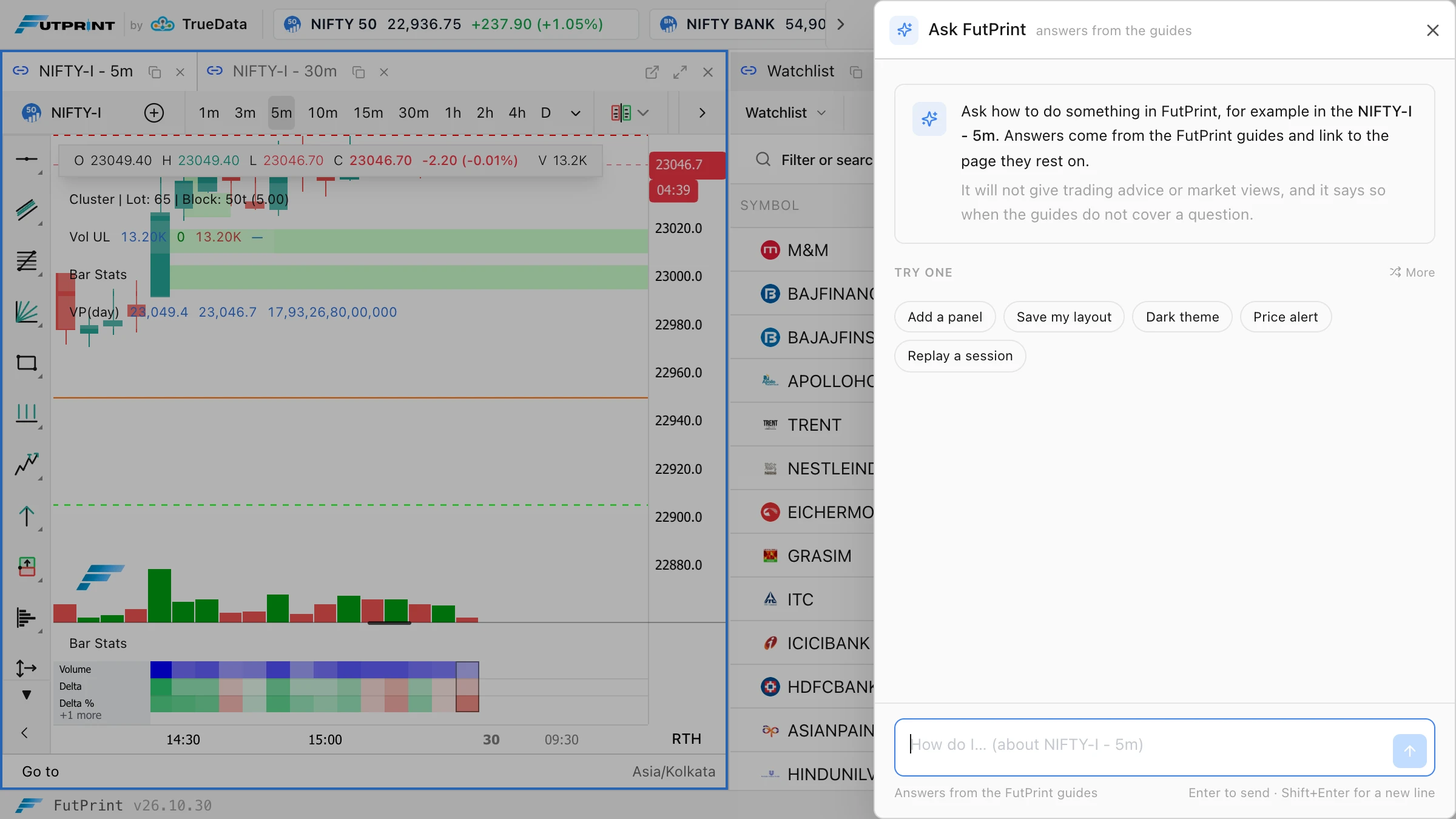
The **Ask** button opens a drawer on the right, the same shape as the Add widget drawer. The empty drawer offers a handful of starter questions chosen for the panel you were on, so a trader on the Watchlist sees column and preset questions first, and a trader on a chart sees replay, alerts and indicator settings. Type your own, press Enter, and the answer streams in.
What it knows is the published documentation, all of it: every page of the FutPrint guides, from installing the desktop app to the Strategy Tester, turned into one reference the assistant reads on every question. Nothing is retrieved by keyword and nothing is summarised in advance, so a question that spans two pages gets both. When the guides change, the reference is regenerated with them.
Two things ride along with each question: the title of the focused panel, so "where is that setting" is read against the right panel, and your plan, so the answer can say when a feature is in Pro and Max where the guides say so. Your charts, workspaces and account details are not sent.
Three questions and what came back
"How do I add the Flow columns to my Watchlist?" The answer names the **Columns** menu behind the sliders icon in the Watchlist toolbar, the **Flow** group inside it with its seven columns, and the **Flow** preset at the top of the menu that switches them all on at once. It adds that the columns are seeded from the day's one-minute footprint, so they read correctly the moment they appear, and that the choice is saved with the workspace. The Read more chip opens the Watchlist guide in a new tab, so the workspace stays where it is.
"Where do I change the footprint imbalance threshold?" This one lives in a settings page most traders have not scrolled through. The answer gives the path through **Chart Settings** to the **Footprint** tab and the **Imbalance Ratio** control, with the default and the range the guide states, and links the footprint settings page.
"Can I remap the chart shortcuts and put 15m on key 1?" The guides do not cover remapping, and the assistant says so in its first words, under a label that reads **Not covered by the guides**. It then gives what the guides do say: keys 1 to 9 set fixed timeframes, and lists them. That is the behaviour we care most about. When the documentation has no answer, the assistant tells you rather than inventing a menu.
What it will not do
It answers questions about using FutPrint, and only those. Ask it where NIFTY is heading, whether to buy a strike, what another platform does, or anything unrelated to the terminal, and it replies with one line saying it can only help with using FutPrint. Instructions hidden in a question, of the "ignore your rules" kind, are read as part of the question and get the same line.
It does not write code. A request for an indicator or strategy gets a pointer to **Compose with AI** in the Script Editor, which is built for exactly that, and a link to the Script Editor guide.
It also does not guess. A control it names is a control the guides name. When it is unsure the guides cover something, it says so. Before release we put 120 questions through it, written against the guides, including twenty the guides do not answer and twenty that were off-topic or tried to change its rules. Every off-topic question got the refusal, and not one answer invented a menu path or linked a page that does not exist.
Every plan, with a fair allowance
Ask FutPrint is included in every plan. Each account gets forty quick answers a day; after that the assistant still answers, one question a minute, up to three hundred a day. The count resets at midnight IST and the status line under the question box shows where you stand. A refusal counts like an answer, so the box is for questions about the terminal.
What we keep, and why
Questions and answers are stored with your account so the team can read what traders ask and where the guides fall short. A question that gets "not covered by the guides" is a page we should write; a question that gets the wrong page is a heading we should rename. That review is how the guides and the assistant improve together. The conversation also stays in your browser tab until you clear it, so a follow-up has context.
Treat the box like a support chat: there is no reason to type a password or a payment detail into it, and the assistant will send account and billing questions to [email protected] anyway.
Asking well
- Name the panel or the setting if you know it. "The imbalance threshold in the footprint settings" lands on the right page faster than "the ratio thing".
- Ask one thing at a time. "How do I add the Flow preset and set an alert on CVD" is two questions; the second gets a better answer on its own.
- Use the follow-up. The assistant keeps the last few turns, so "and how do I save that layout" after a Watchlist answer is understood.
- Open the Read more chip. The answer is the short version; the guide has the screenshots, the defaults and the edge cases.
- Say when it is wrong. Clear the conversation and ask again with more detail, or tell us on Discord. Every exchange is reviewed.
Exercises
- Open a panel you rarely use, press Ask, and take the first starter question. Compare the answer with the panel in front of you.
- Ask about a setting you already know well and check the controls it names against the dialog. If one is wrong, that is exactly the kind of thing we want to hear about.
- Ask something the guides should cover but probably do not. Watch for the "Not covered by the guides" label, then open the nearest page it offers.
Where to find it
Ask FutPrint is the **Ask** button in the terminal header, beside **Widgets**, on every plan. The workspaces guide describes it under Ask FutPrint, the pricing page lists the allowances, and the Script Editor guide covers Compose with AI for writing scripts.