
 by TrueData
Compose with AI: describe an indicator, get the script
How the Script Editor's AI composer turns a plain-language description into a compiled OpenScript indicator or strategy, what it will and will not do, and how to get good scripts out of it.
FutPrint by TrueData · Published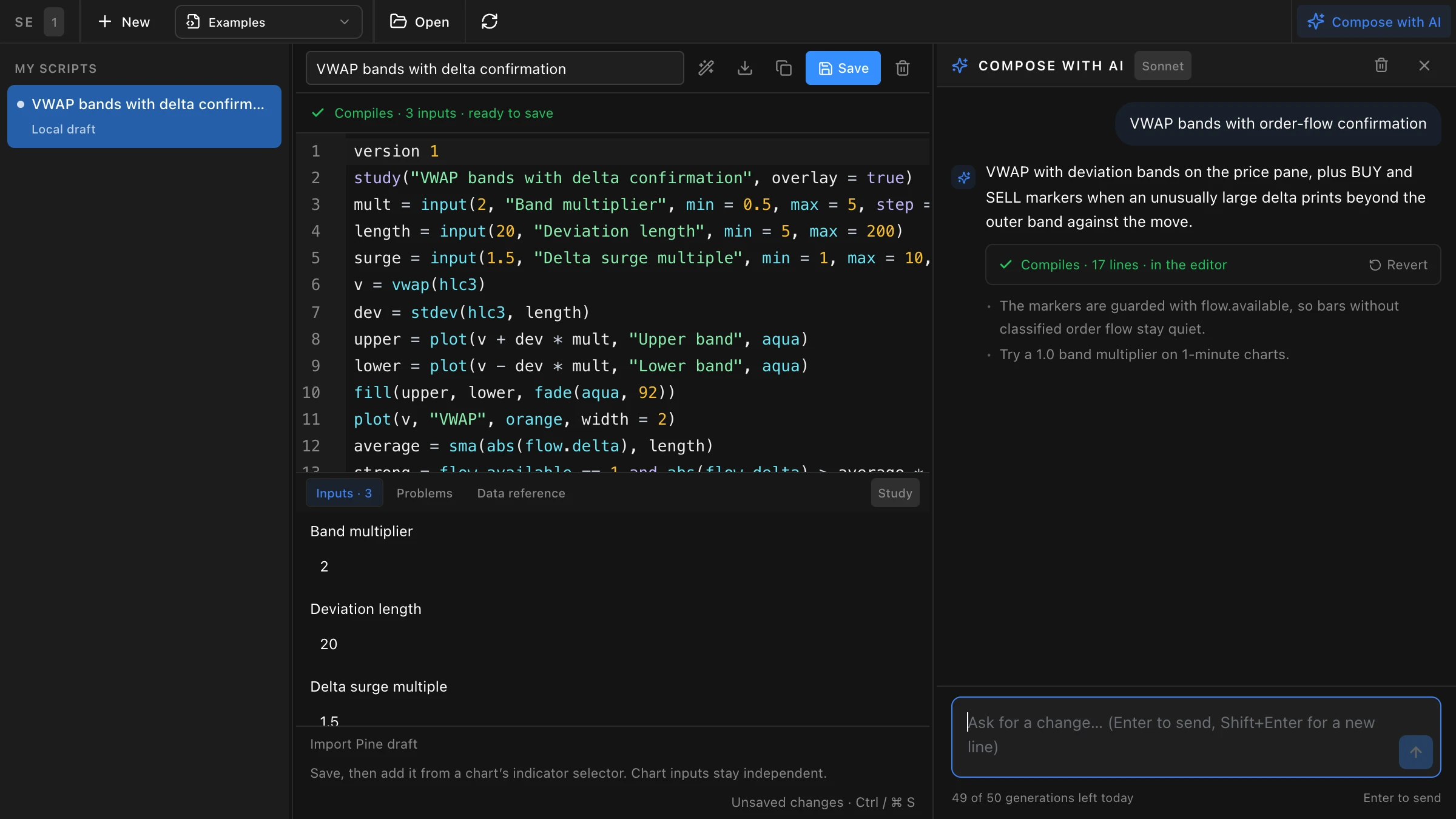
From a sentence to a script
The Script Editor has let FutPrint traders write their own indicators and strategies in OpenScript for a while. Most people who open it have a clear idea of what they want on the chart and a less clear idea of how to express it in code. Compose with AI closes that gap. Describe the study in plain words, and the script is written for you, typed into the editor as it is generated, compiled the moment it finishes and fixed when the compiler objects.
It lives beside the editor, so nothing about the workflow changes. The script you end up with is an ordinary saved script, listed under My scripts in every chart's indicator list, with its inputs set per chart and its plots styled from the Style tab. The writing is done by Claude, Anthropic's model, with the OpenScript reference and FutPrint's data contract in its instructions, so it writes against the same compiler your chart uses. The composer is included in the Pro and Max plans, trials included, with an allowance of fifty generations per account per day.
This guide walks through what happens when you press Enter, three requests and what they produce, how to revise a script in conversation, and the limits worth knowing before you rely on it.
What happens when you press Enter
Open the Script Editor from Widgets, under Charting & Analysis, and press Compose with AI in the toolbar. A conversation panel opens on the right with a prompt box and a handful of starters covering price studies, order flow, open interest and strategies. Type a request or pick a starter.
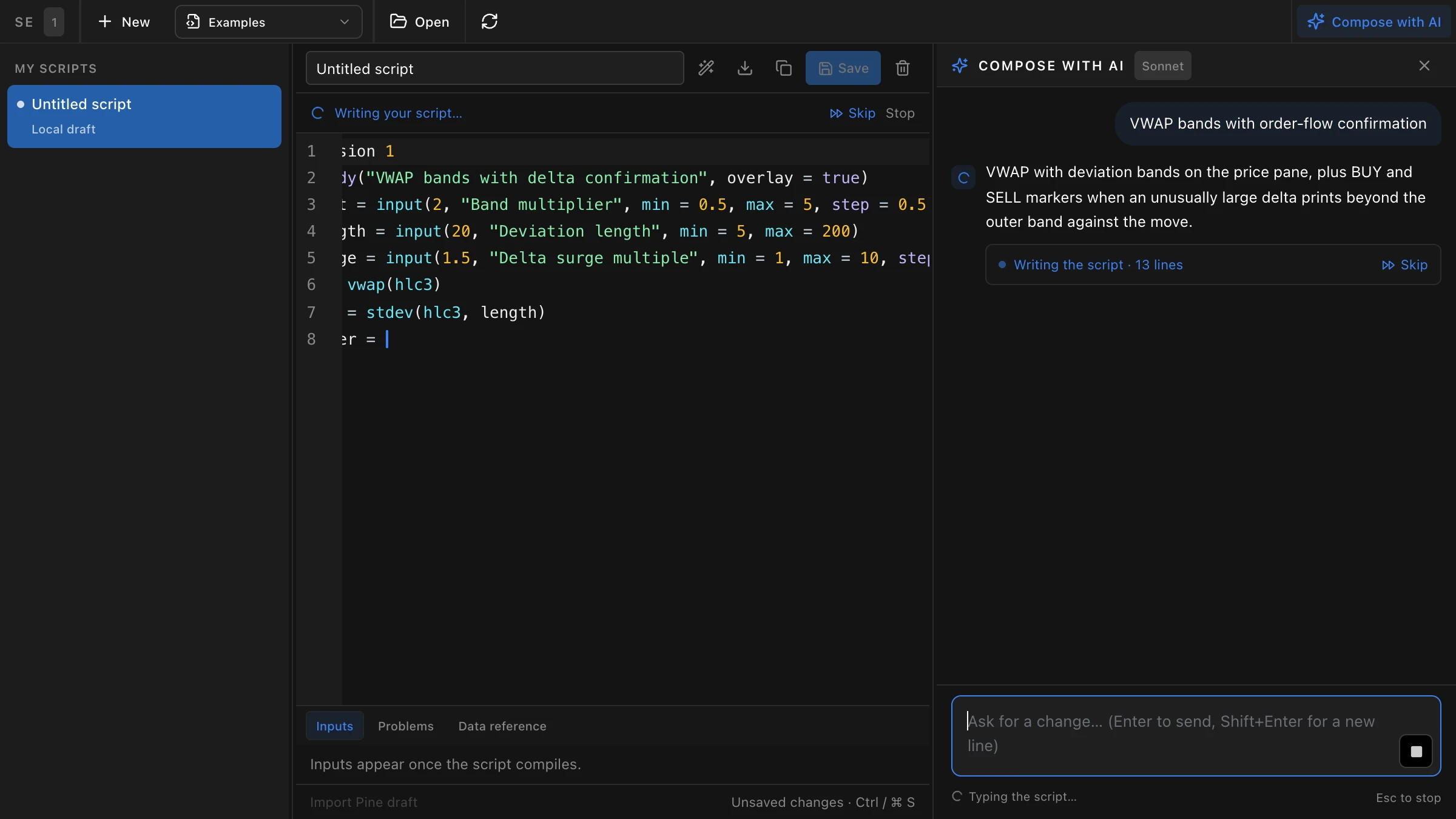
Each request carries three things: your words, the script currently in the editor, and the earlier turns of the conversation for that script. Your charts, your account and your other saved scripts are not sent. The reply comes back in a fixed shape: a sentence or two on what the script does, the complete script, and up to three short notes on assumptions or caveats.
The script is typed into the editor as the reply streams, so you can read it as it is written. Skip shows the whole thing at once; Stop, or the Escape key, ends the reply and keeps what has arrived. When the last line lands the compiler runs. If it compiles, the status bar says so, the inputs appear below the editor, and an untitled draft takes the title the script declares. If it does not, the composer sends the compiler's complaint back once by itself and asks for a corrected script. After that, Ask AI to fix is a button, used when you choose.
Nothing reaches your account until you press Save. Until then the script is a local draft, and Revert on any reply puts the previous version back.
Three requests and what they produce
The composer knows the OpenScript language, the FutPrint data a script can read and the indicator library. These three requests cover the ground most traders start on.
A price study: VWAP with deviation bands
"VWAP with one and two sigma bands, shaded between the outer bands." The reply is an overlay study on the price pane: a VWAP line, the bands as plots, a fill between the outer pair, and inputs for the deviation length and the multipliers, so the numbers can be changed from the chart's settings rather than the code. Ask for order-flow confirmation and it adds markers that fire only when the bar's delta is unusually large, guarded so bars without classified order flow stay quiet.
An open-interest study: colour the bars by build-up
"Colour the bars by OI build-up: long build-up green, short build-up red, short covering teal, long unwinding orange." This one reads the open-interest series a script gets on futures and options, classifies each bar against the previous one, and colours the bars to match. The note that comes back is worth reading: open interest is none on an index or an equity, so the script checks for it before colouring, and the colours stay off where there is nothing to read.
A strategy: EMA cross with a delta filter
"A strategy that buys one lot when the 9 EMA crosses above the 21 EMA with positive delta on the entry bar, with a one percent stop and a two percent target." The reply declares a strategy instead of a study, sizes orders in lots, enters only when flat, and exits on the stop, the target or the opposite cross. Apply it to a chart and the Strategy Tester backtests it over the loaded bars with estimated Indian charges, a stop that fills like a stop order and a target that fills like a limit, inside the bar.
A script that compiles is a script that runs. Whether it is any good is a separate question, and the Strategy Tester, market replay and your own eyes answer that one.
Revising instead of rewriting
The second request is where the composer earns its place. Once a script is in the editor, every message is a revision: "make the bands dashed", "add an alert when a bar closes outside the upper band", "turn this into a strategy with a two-to-one target". The reply carries the whole script again, with your names, inputs and colours kept and only the asked-for part changed, so what you save is never a fragment.
Conversations are kept per script for the session. Open another script and its conversation is its own; come back and the earlier turns are still there. If a revision goes somewhere you did not intend, Revert on that reply restores the version before it, and the next request starts from there.
Questions are fine too, as long as they are about the script. "What does flow.deltaPercent measure?" or "why is the signal firing on every bar?" get a short answer with no code block, and the script in the editor is left alone.
What it will not do
The composer writes and revises OpenScript for FutPrint charts, and that is all it does. Ask it about anything else, from the news to the weather to the model behind it, and it answers with one line saying so. That reply still counts toward the day's allowance, so the box is for scripts.
It does not predict the market or advise on trades. Describing a setup is your job; it turns the description into code. It cannot see your chart, so a request that depends on what is on screen, such as "mark the level I drew", has nothing to work from, while one that describes the rule, such as "mark the session's VWAP at the open", does.
A compiled script is not a tested one. Order-flow, open-interest and footprint values are none where the feed had nothing to classify, footprints are none on index symbols, and all three read the chart's own interval only. The composer guards for that when it knows to, but a backtest on completed bars with estimated charges is still an estimate, and live execution differs.
Saved scripts count toward the chart's indicator limit on each plan, like any other study.
Getting good scripts out of it
Most weak replies come from vague requests. A few habits make the difference.
- Name the data. "Delta" means the bar's buy volume minus its sell volume; "OI change" means the bar-over-bar change in the level; "footprint POC" means the price inside the bar with the most volume. Naming it removes the guess.
- Say where it goes. An overlay sits on the price pane; an oscillator wants its own pane, and a bounded one wants a range. "On the price pane" or "in its own pane from 0 to 100" settles it.
- Give the numbers. A length, a multiple, a percentage. They become inputs with sensible ranges, which is better than a constant buried in the code.
- One change per message. "Make the stop two ATRs and also add a volume filter and change the colours" is three revisions. Send them one at a time and Revert works per step.
- Read the notes. The lines under the script say what was assumed and where the data can be none. They are short because they matter.
- Check Problems, then test. The Problems tab lists what the compiler sees; the Strategy Tester and replay show what the script does.
Exercises
- Take an indicator you already use and describe it in one sentence. Compare the composed script with your settings and note what the description left out.
- Compose a study that reads one order-flow series, one open-interest series and one footprint series. Switch the chart to an index and watch which plots go quiet, and why.
- Write a strategy with a stop and a target, run it in the Strategy Tester, then ask for one change at a time until the trade list reads the way you intended.
Where to find it
Compose with AI is in the Script Editor, under Widgets and Charting & Analysis, on the Pro and Max plans with fifty generations per account per day that reset at midnight IST. The Script Editor guide in the docs covers the editor, the data a script can read and the Strategy Tester, and the pricing page has the plan comparison.